How to make the 365 elevator trend
You can make the 365 elevator trend in about 15 minutes, with no editing app and no prompt. You need two photos and one payment.
1. Pick the two photos
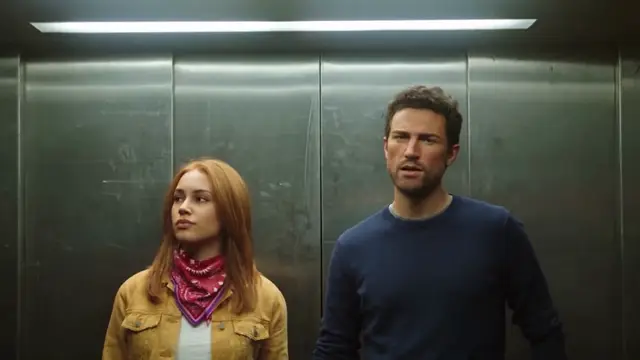
Photo 1 is the person who already waits in the elevator. Photo 2 is the person who walks in, turns around and stands beside them. For both:
- one person per photo, face to the camera, sharp and in good light;
- waist up or knees up, because the video shows you from the waist up in the clothes you wear in the photo;
- no sunglasses and no beauty filter.
2. Get the order right
The order decides the roles. If you want the "who is this?" reaction, put the surprising one in photo 2: they get the walk-in and the turn. In a "then vs. now" edit, put your current photo first and the older one second.
3. Upload and pay once
On the home page, add photo 1 and photo 2 and tap "Make my video". You pay once with a card, Apple Pay or Google Pay through Stripe. There is no subscription and no account.
4. Wait 5 to 15 minutes
Seedance 2.5, a video model by ByteDance, takes the original 14-second elevator clip as a reference and rebuilds it shot for shot with your two photos in place of the two people. The song is added afterwards. You can leave the page open, or come back later on the same phone and browser.
5. Download and post
You get a 16:9 MP4 with the song "365", plus a copy without the song. On TikTok, post it with the "365" sound or keep the original audio. Hashtags: #365edit #365elevatortrend #sampagne. Captions: "the duo nobody expected" or "who should be next?".
Common problems
| Problem | Fix |
|---|---|
| A face looks slightly off | Use a sharper, front-facing photo where the face is larger, and make a new one. |
| You two swapped places | Photo 1 always waits, photo 2 always walks in. Check the order. |
| A cap or neck scarf shows up | That comes from the original clip; it is rare. Making a new take usually fixes it. |
| The video failed | It is retried automatically, then refunded in full. |

 The two photos that went in (AI-made people).
FAQ
Do I need CapCut to make the 365 elevator trend?
No. CapCut templates cannot make two people walk into an elevator. An AI video model does it from two photos.
Which photo goes first?
Photo 1 is the one who waits in the elevator, photo 2 is the one who walks in.
How long is the video?
14 seconds, 16:9, with the song.