The 365 Elevator AI trend, starring you two
Add two photos. One of you waits in the steel elevator, the other walks in, turns and stands beside you, a glance, a pose, and you both stare into the camera to the song "365". You get a 14-second 16:9 video with the song, ready to post.
- 2 photos
- 14 s · 16:9
- With the song "365"
- No watermark
- One-time payment
One person per photo, face clear, waist up. One-time payment, no subscription.
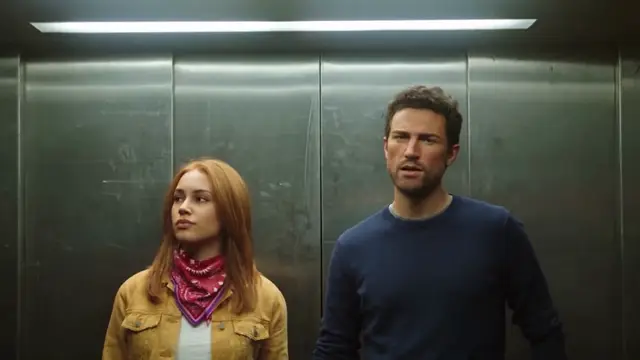

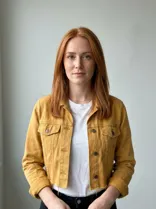 The two photos that went in (AI-made people).
What is the 365 elevator trend?
The 365 elevator trend (also called the 365 Sampagne elevator AI trend, the 365 edit or the unexpected duo elevator edit) is an AI video format that took over German TikTok in November 2026 and spread to the US within days. Every clip is the same scene: a brushed steel elevator under two white strip lights, a camera locked straight on, and two people who should not be in the same elevator.
One person already stands inside, calm. The second walks in with the back to the camera, turns around, touches their hair, and stands beside the first. They glance at each other, one makes a small hand move, and both end on a flat, unimpressed stare into the lens. There is no text and no dialogue, only the song "365" by Sampagne. The joke is the pairing: rivals, exes, a person and their younger self, a person and their dog.
The first edits used AI versions of famous faces. This site makes the same scene with your two photos, so it is you and your friend, partner, sibling or pet in the elevator.
How to make the 365 elevator video here
- Add photo 1: the one who waits. A clear, front-facing photo, waist up. This person stands in the elevator from the first second and ends on the right.
- Add photo 2: the one who walks in. Same rules. This person walks in with the back to the camera, turns, and ends on the left. The order matters.
- Pay once. One video, one payment from $9.99, no subscription and no account. Checkout is handled by Stripe.
- Wait 5 to 15 minutes. The video is made by Seedance 2.5, a video model that copies the trend clip shot for shot with your two photos in place of the two people. Keep the tab open or come back later on the same phone.
- Download or share. You get a 14-second 16:9 MP4 with the song, no watermark. A copy without the song is there too.
Want the details first? Read the full guide to making the 365 elevator trend.
Shot by shot: what happens in the 14 seconds
Your video follows the original edit second by second. One continuous take, no cuts, the camera never moves.
| Time | Photo 1 (waits) | Photo 2 (walks in) |
|---|---|---|
| 0–1 s | Stands alone in the elevator, calm, fixes the top. | Not in the frame yet. |
| 1–2.5 s | Waits and looks ahead. | Walks in from the right, back to the camera, steps to the left. |
| 2.5–4 s | Stays cool. | Turns around, looks around, touches the hair by the ear. |
| 4–10 s | Glances over, touches the face, a small hand move. | Stands beside, poses with the arms down, glances back. |
| 10–14 s | Deadpan stare into the camera. | Deadpan stare into the camera. |
The beat of "365" carries the whole clip, so the stare at the end lands on the drop. That is why the format works without any caption.
Which photos work best?
- One person per photo, face clearly visible, looking at the camera, in good light.
- Waist up or knees up. The video shows you from the waist up, so the clothes in your photo are the clothes in the video.
- No sunglasses, masks or heavy filters. Glasses and hats are fine if you want them in the video.
- Unexpected pairs win. Very tall and very short, formal and sporty, you and your boss, you and your dog in photo 2.
- Then vs. now: a recent photo as photo 1 and an older photo of you (as an adult) as photo 2, and your past self walks in.
Only use photos of people who agreed to it. Never upload a stranger, a minor or a public figure.
Who should you put in the elevator?
The original account asked "who do you want to see next?" under every clip, and the comments filled up with pairings. With your own photos, the ones that get shared most are:
- You and your best friend, captioned "the duo nobody expected".
- You and your partner, the couple version of the AI elevator trend.
- Siblings, especially with a big age gap.
- You and your younger self, the "then vs. now" version.
- You and your pet: a dog or cat walks in with its own body and fur.
Sound, caption and hashtags for posting
Your video already has the song "365" on it, the same 14 seconds as in the trend. On TikTok you can also pick the official "365" sound and lower the original audio. Captions that work: "the duo nobody expected", "who should be next?", or the German original "wen wollt ihr als nächstes sehen?". Hashtags used by the trend: #365edit, #365elevatortrend, #sampagne, #elevatoredit, #aitrend.
The song belongs to its rights holders. Posting it on TikTok, Instagram Reels or YouTube Shorts follows each platform's music rules; for ads or paid posts, check the licence first.
Why not a CapCut template?
The CapCut templates that tutorial accounts share for the 365 edit only cut the song to a slideshow or paste your face onto a still. They cannot make you walk into an elevator, turn around and stare into the camera. That part needs an AI video model that rebuilds the scene with your two photos, which is what this site does. More in 365 elevator CapCut template vs. AI.
Questions and answers
What is the 365 elevator AI trend?
An AI duo edit set to the song "365" by the German artist Sampagne. One person waits in a steel elevator, a second walks in with the back to the camera, turns, glances over and poses, and both end staring into the camera. It started on German TikTok on 19 November 2026.
How do I make the 365 elevator trend with my own photos?
Add a photo of the person who waits (photo 1) and the person who walks in (photo 2), pay once, and get a 14-second 16:9 video with the song in 5 to 15 minutes. No app, no editing and no prompt.
How much does it cost?
One video is a one-time payment, from $9.99. There is no subscription and no account. The price is shown before you pay.
Does the video have the song?
Yes. Your video comes with the 14 seconds of "365" by Sampagne from the trend. A copy without the song is also included.
How long does it take?
Usually 5 to 15 minutes. The video is made by an AI video model on a queue; you can keep the page open or come back later on the same device.
Can I use a pet or a cartoon in one of the photos?
Yes. Whoever or whatever the photo shows takes that place in the elevator with its own body. People work best; pets usually work well.
What if the video fails?
If the video cannot be made, it is retried automatically once. If it still fails, your payment is refunded in full automatically.
Is this affiliated with Sampagne or the original creator?
No. This is an independent tool that recreates the scene of a public trend with your own photos. It is not affiliated with Sampagne, her label, the creators of the original edits, TikTok or CapCut.
Guides
- What is the 365 elevator trend?Where the Sampagne elevator edit came from and why it works.
- How to make the 365 elevator trendTwo photos, the right order, and how to post it.
- "365" by Sampagne, the elevator trend songRelease dates, the TikTok sound and which part the edits use.
- The 365 elevator AI promptThe exact prompt, settings and timing for Seedance 2.5.
- 365 elevator CapCut template: the alternative that actually worksWhat CapCut 365 templates can do, and the AI alternative.